
RPA Invoice Automation with Microsoft Power Automate: Save Hours and Boost Efficiency
Revolutionizing Invoice Processing with RPA and Microsoft Power Automate
In today’s digital era, efficiency is key. Many organizations still rely on manual invoice entry — downloading attachments, typing data, and uploading them into ERP systems. This process is time-consuming, error-prone, and expensive.
With RPA (Robotic Process Automation) powered by Microsoft Power Automate, your business can completely transform how invoices are handled — from email to ERP — automatically.
How It Works
Our solution intelligently manages invoices sent by suppliers or customers via email.
Instead of manually downloading and entering data, Power Automate performs every step seamlessly:
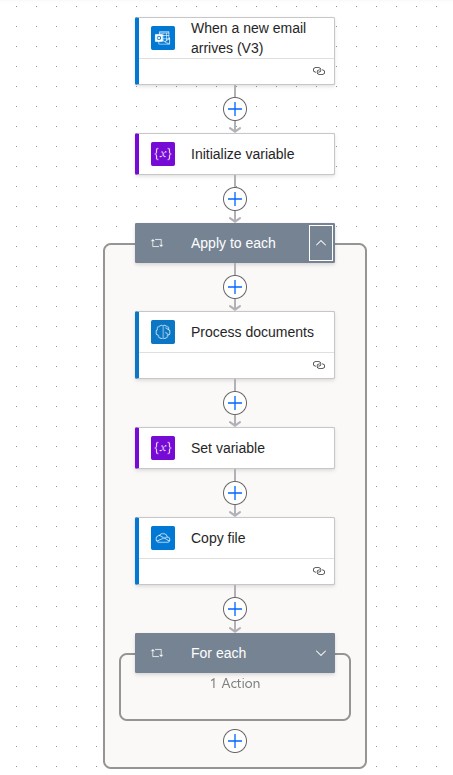
Email Capture: The automation monitors a shared mailbox for new invoice emails.
Invoice Recognition: When a PDF invoice arrives, AI Builder automatically extracts key details — invoice number, supplier name, product name, quantity, unit price, and total.
Excel Generation: The extracted data is added to a structured Excel sheet, automatically saved in OneDrive or SharePoint.
ERP Integration: The Excel file is ready for import into your ERP system, completing the workflow end-to-end.
Business Impact
This automation reduces manual data entry and improves accuracy dramatically. Happier and more productive teams.
| Metric | Before Automation | After Automation |
|---|---|---|
| Processing time per invoice | 10–15 minutes | Less than 1 minute |
| Monthly hours (for 1000 invoices) | 200–250 hrs | 20–25 hrs |
| Accuracy | ~80% | 95%+ |
| Annual savings | — | $ 20 k – $ 25 K per annum |
Technology Stack
Our RPA flow uses Microsoft’s native ecosystem for reliability and scalability:
-
Microsoft Power Automate (Flow)
-
AI Builder (Form Processing Model)
-
Outlook Connector for email trigger
-
Excel Online (Business) Connector for structured data
-
OneDrive / SharePoint for secure cloud storage
-
ERP Import Integration for downstream processing
Key Benefits
- Eliminate manual data entry errors
- Improve processing speed and visibility
- Reduce costs and operational workload
- Ensure centralized and secure document management
- Easily scale to handle high invoice volumes
Start Your Automation Journey
It’s time to let automation do the typing for you.
With Microsoft Power Automate, your invoice process becomes:
🔹 Smart – Automatically identifies and extracts document data
🔹 Efficient – Reduces turnaround time drastically
🔹 Cost-Effective – Saves millions every year
Contact us today to learn how your organization can implement RPA for faster, more accurate invoice processing.